> For the complete documentation index, see [llms.txt](https://tech-house-market.gitbook.io/help/llms.txt). Markdown versions of documentation pages are available by appending `.md` to page URLs; this page is available as [Markdown](https://tech-house-market.gitbook.io/help/fl-studio/how-to-install-and-use-tech-house-market-project-files-in-fl-studio.md).
# How to Install & Use Tech House Market Project Files in FL Studio
This guide explains how to open and use Tech House Market (THM) third-party FL Studio project files in any modern version of FL Studio.
All Tech House Market FL Studio projects are delivered as **FL Studio Zipped Looped Packages**, which means setup is **plug-and-play**.
### Important – Read This First
> **You do NOT need to extract the ZIP file.**
FL Studio can open **Zipped Looped Packages directly**.
You can simply:
* Open FL Studio
* Select **File → Open**
* Choose the **ZIP file**
FL Studio will load the project with **all samples included automatically**
### What Is a Zipped Looped Package?
A **Zipped Looped Package** is an official FL Studio project format that:
* Contains the `.flp` project file
* Includes **all samples used in the project**
* Preserves routing, automation, and arrangement
* Prevents missing sample errors
This is the **recommended and safest** way to share FL Studio projects.
### Option 1 – Open the ZIP File Directly (Recommended)
1. Download the project ZIP file from your **Tech House Market account**
2. Open **FL Studio**
3. Go to:
```
File → Open
```
**or**\
Drag the ZIP file directly into FL Studio
4. Select the `.zip` file
✅ The project will open immediately\
✅ All samples will load correctly\
✅ No extraction required
***
### Option 2 – Extract the ZIP File (Optional)
Some users prefer working with extracted folders. This is optional.
1. Right-click the ZIP file → **Extract / Unzip**
2. Move the extracted folder to:
```
Documents → Image-Line → FL Studio → Projects
```
3. Open FL Studio
4. Open the `.flp` file normally
Both methods work exactly the same.
***
### If FL Studio Asks for Missing Samples (Rare)
This should rarely happen, but if it does:
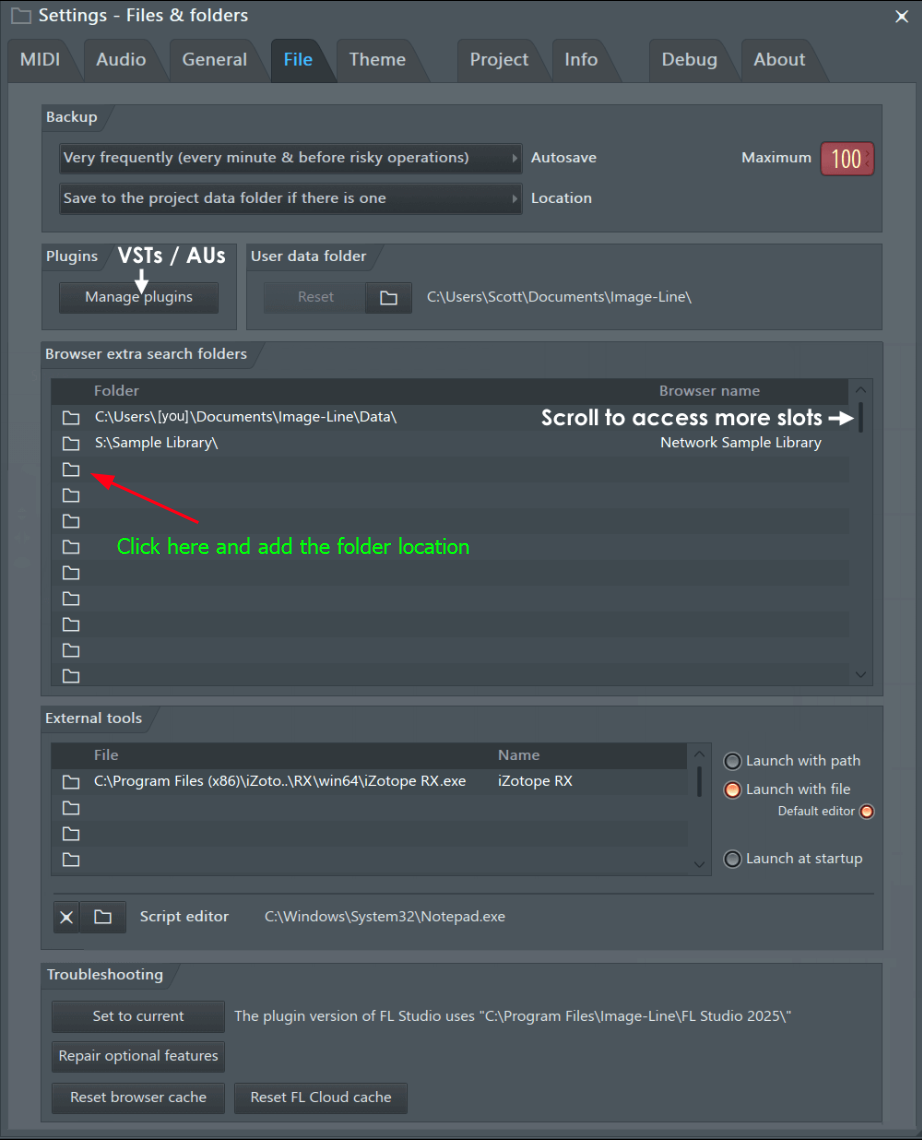
1. Go to:
```
Options → File Settings
```
2. Under **Browser Extra Search Folders**:
* Add the folder containing the project
3. Reopen the project
FL Studio will automatically locate all files.
***
### Plugins & Compatibility Notes
* Most Tech House Market projects use **FL Studio stock plugins**
* If a third-party plugin is not installed:
* It will load as **disabled**
* MIDI, automation, and routing remain intact
* You can safely replace missing plugins with your own
**Producer Edition or higher is recommended.**
***
### Save Your Own Version (Recommended)
Once the project is open:
```
File → Save As → Rename the project
```
This keeps the original file intact and allows you to experiment freely.
***
### Common Mistakes to Avoid
❌ Opening the project from inside a compressed preview\
❌ Moving files after opening the project\
❌ Renaming folders after extraction\
❌ Opening projects from temporary locations
***
### Best Workflow Tips
To get the most value from Tech House Market projects:
* Study:
* Drum programming & groove
* Mixer routing & gain staging
* Automation curves
* Replace sounds while keeping arrangement
* Drag samples into your **Favorites**
* Rebuild the track from scratch using the same structure
These projects are designed as **learning tools**, not just templates.
***
### Need Help?
If you experience any issues:
📩 **Contact:**\
****
Please include:
* Your FL Studio version
* Operating system
* Screenshot of the issue
***
#### Final Note
Because Tech House Market FL Studio projects are delivered as **Zipped Looped Packages**, setup should be effortless.
> **Download → Open ZIP in FL Studio → Start producing**
Happy producing 🚀